

Introduction
This package is for growing random graphs and trees by using continuous quantum walks:
- One or more quantum walkers evolve on a graph, and at random times their wave function collapses on its nodes.
- A new node is attached to all the nodes where a walker collapsed.
By alternatning evolution and collapse and by controlling the average exploration time we can grow graphs and trees with various characteristics.
Installation
Install via pip:
pip install quantumgraphs
Import like so:
from quantumgraphs import QGraph, QGraphList
The QGraph class
initialization and basic usage
The QGraph class represents a single graph, which is instantiated as a trivial graph with a single node.
The required parameters are the number of quantum walkers and the average exploration time between collapses:
G = QGraph(walkers = 1, exploration=0.5)
We can grow the graph by adding nodes:
G.add_nodes(nodes = 100)
Now the graph G has 101 nodes (G.nodes returns 101).
Visualizations
We can visualize a graph via
G.draw(node_size=30)
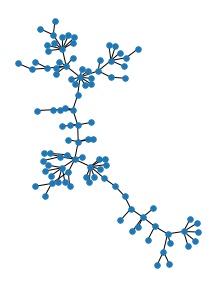
If we also wish to export the diagram, we can pass a filename argument:
G.draw(node_size=30, width=0.5, filename = 'example_graph.jpg')
The QGraphList class
The QGraphList class is for managing a collection of QGraph objects, which are internally stored in a list.
The QGraphList class contains a number of utilities and it's meant to work in a flexible way.
The repr of a QGraphList object returns a handy Pandas DataFrame with a summary of its contents, which is particularly nice when working in a jupyter notebook environment.
Initialization and basic usage
GL = QGraphList()
We populate it by growing random graphs according to the desired specs. This is automatically done in parallel via p-tqdm, with a visual bar that indicates the status of the computation:
specs = [{'walkers':w, 'nodes':n, 'exploration':t} for t in [0.1,0.5,1.0] for w in [1,2,3] for n in [100,200]]
GL.grow_random_graphs(specs*3) # 3 copies of each spec for statistical experiments
We can populate the database at any time, any number of times. Each new graph is treated as a distinct object.
We can observe a few properties of the graphs by invoking GL.dataframe.
Visualizations
The properties of the graphs can be visualized as follows (using Seaborn internally):
ax = GL.lineplot(x='exploration', y='diameter', hue='walkers', style='nodes')
ax.set_xscale('log')
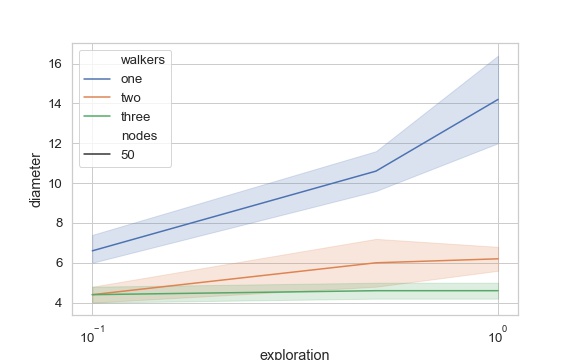
Notice that the lineplot method returns a matplotlib Axes instance to allow for further customization and export:
fig = ax.get_figure()
fig.savefig("diameter.pdf", bbox_inches='tight')
Utilities
Filtering elements
We can select and/or exclude parts of the collection:
GL.select('walkers', [1,2])
As the select and exclude methods return new instances of QGraphList, we can chain them with any other class method:
GL.exclude('walkers', [1]).select('nodes', [200]).lineplot(x='exploration', y='clustering', hue='walkers')
QGraphList is an iterable sequence:
QGraphList objects are iterable:
[g.nodes for g in GL]
and the elements can be accessed by index (e.g. graph = GL[3]).
Merging QGraphList instances
QGraphList objects can be merged simply by summing them:
G1 = QGraphList()
G1.grow_random_graphs([{'walkers':1, 'nodes':50, 'exploration':0.1}]*5)
G2 = QGraphList()
G2.grow_random_graphs([{'walkers':2, 'nodes':50, 'exploration':0.1}]*5)
GL = G1 + G2
Saving and loading
As computations with large graphs might become expensive, we can save and load a QGraphList object:
GL.save('large_database.npy')

GL = QGraphList()
GL.load('large_database.npy')
Once we save a QGraphList object, saving becomes automatic every time we add new QGraph objects to it.